
Instagram Video Downloader

Paste an Instagram link to download a video in the best available quality—no registration required.

Nothing found — please double-check the link and try again.

How to download a video from Instagram by link?

Follow these simple steps to save videos from public accounts.
  • how

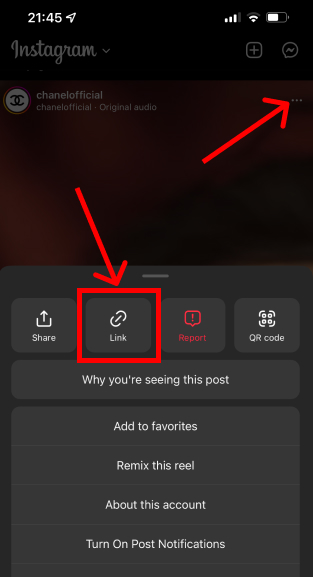
    Copy the URL

    Open the post, tap "..." and select "Copy link".
  • how

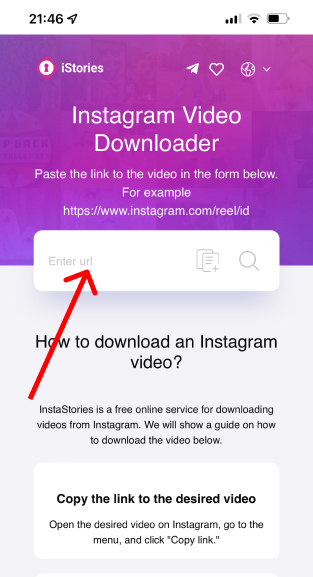
    Paste the link

    Paste the copied URL into the field above.
  • how

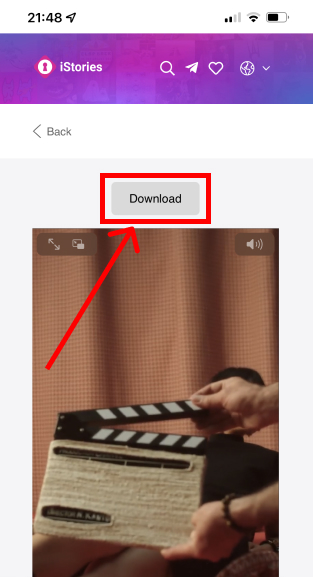
    Click "Download"

    Wait for processing and download the file in the available quality.

About this Instagram video downloader

This tool helps you save Instagram videos to your device when Instagram itself only offers sharing or saving to favorites. You paste a link, we fetch the available media files, and you can download them instantly.

It works for public content: regular posts, Reels, and IGTV links. If the profile is private or the post is restricted, downloading is not available.

For best results, use the original post URL copied from Instagram. We try to offer the highest quality version available (often up to 1080p) in MP4 format.

How It Works

When you paste a link, the downloader analyzes the page and finds the direct media URLs that Instagram serves for that post.

Then we display the available file(s) so you can download the one you need. The exact formats and resolutions depend on the original upload and Instagram's processing.

Frequently Asked Questions

  • Can I download videos from private accounts?
    No. Downloading is only available for public content.
  • What quality will I get?
    We provide the best available quality, typically up to 1080p in MP4.
  • Is there a limit or any fee?
    No fee. You can download as many times as you want (with reasonable rate limits).
  • Which Instagram links are supported?
    Most public links are supported: posts (/p/), reels (/reel/), and IGTV (/tv/).
  • Do I need to log in to Instagram?
    No. Just paste a public link—the tool works without login.
  • Will my download have a watermark?
    No. We don't add watermarks—you get the media as Instagram provides it.
  • Why do downloads sometimes fail?
    This may occur if the link is invalid, the account is private, the post was removed, or Instagram temporarily limits requests. Please try again later.
  • Can I download multiple videos from a single post?
    If a post contains multiple media items, we'll show all available files so you can download each one.
  • Do you store videos or keep a history of the links?
    No. We don't keep a public history; files are provided for direct download upon request.
  • Is it safe to use on mobile?
    Yes. The tool works in modern mobile browsers on iPhone and Android.